For programme committees

Run your conference without the spreadsheet.

Scholaris handles submissions, peer review, decision letters, registration and the final proceedings. Your committee works from one record instead of a shared folder and a mailing list.

Payments
In rupiah, by QRIS, virtual account, e-wallet or card
Review
Single-blind. A reviewer with a conflict cannot be assigned the paper
Guide
The interface is in English. The user guide comes in English and Bahasa Indonesia
Every paper, the same five stages
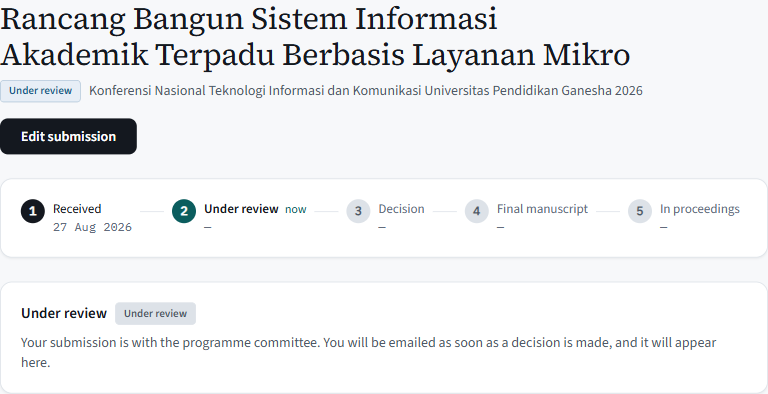
  1. ReceivedAuthor submits the paper
  2. Under reviewReviewers report
  3. DecisionChair decides, and the letter is filed
  4. Final manuscriptAuthor uploads the accepted version
  5. In proceedingsChair publishes the programme

A stage cannot be skipped, and every date on it is recorded.

Who it is for

Built around the four people in every conference

One person can hold more than one role: a chair who also submits, or who also reviews. Each role sees only what its own work needs.

Authors

Author

Submit once, then see exactly where the paper stands.

  • Only real PDFs are accepted. Renaming a Word file to .pdf will not get it through.
  • A live word count on the 300-word abstract, so the limit never surprises you at the last moment.
  • The outcome, the letter, and the reviewer comments. Never scores, never names.
  • Upload the final manuscript once accepted; replace it as often as needed.
Reviewers

PC Member

A queue, a form, and a way to say no.

  • See only the papers assigned to you, with the PDF and abstract.
  • Save drafts as you go. The chair can see you have started, but never your text.
  • Submitting locks your review. Declining tells the chair straight away.
  • Sign in with an email link. No password needed to start.

Chairs

Chair

Every decision with its evidence, and nothing done by accident.

  • Assign reviewers with conflicts flagged. A shared email address blocks the assignment; a shared surname warns you.
  • Decide singly or in batches; revise with a reason and keep the history.
  • Letter templates per outcome, a confirmation before anything is sent.
  • A programme editor, a download of the finished proceedings, and a dashboard listing what still needs you.

Finance & IT

Ops

Money that reconciles and a system that can be restored.

  • Separate rates for students, members and presenters. The presenter rate only opens once a paper is accepted.
  • A reconciliation CSV the treasurer can sum in Excel.
  • Backups run nightly, and we regularly restore from them to check they actually work.
  • A status page showing system health, when the last backup ran, and any recent errors.

The screens you will live in

What authors, reviewers and chairs each see

Real screens from the running product, not mockups. The conference and the people in it are made up.

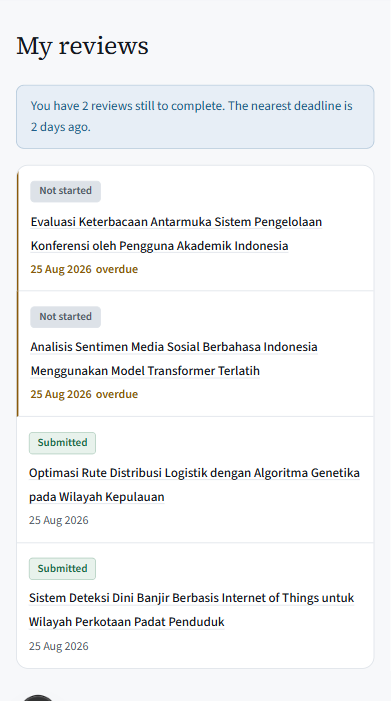
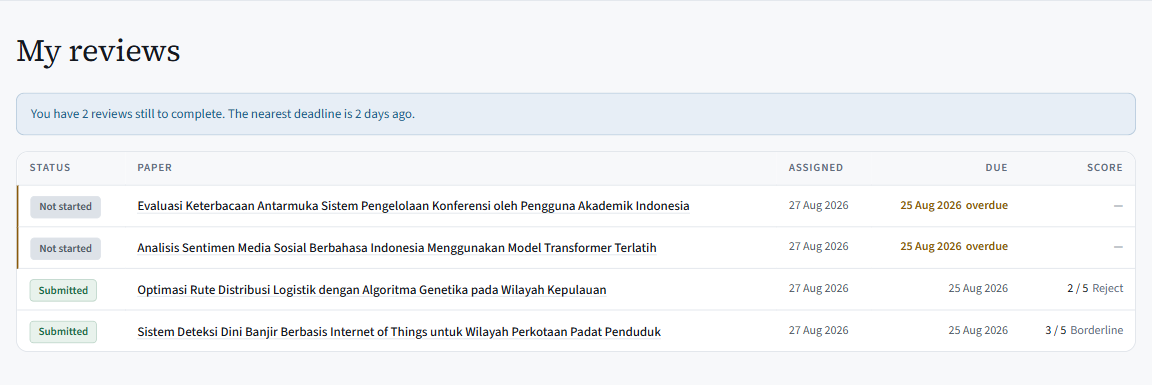
  • ReviewerWhat you owe, and when
    The Scholaris reviewer queue: four assigned papers with status, dates and scores. Two are marked overdue.
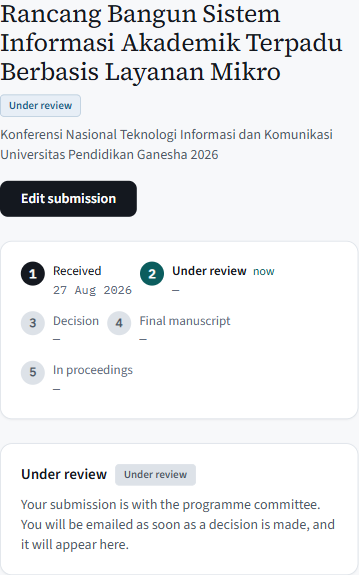
  • AuthorWhere the paper stands
    An author viewing their submission: the five-stage lifecycle rail with stage one dated and stage two current.

How it works

From call for papers to proceedings, in order

The six stages every conference goes through. Each one has to finish before the next can start.

  1. 1

    Open the call

    Name, tracks, timezone and key dates. Every deadline is shown to everyone in the conference’s own timezone, so Jakarta, Jayapura and abroad read the same hour.

  2. 2

    Collect papers

    Authors upload a PDF and list their co-authors. Submissions close at the deadline, even if someone still has the form open.

  3. 3

    Review blind

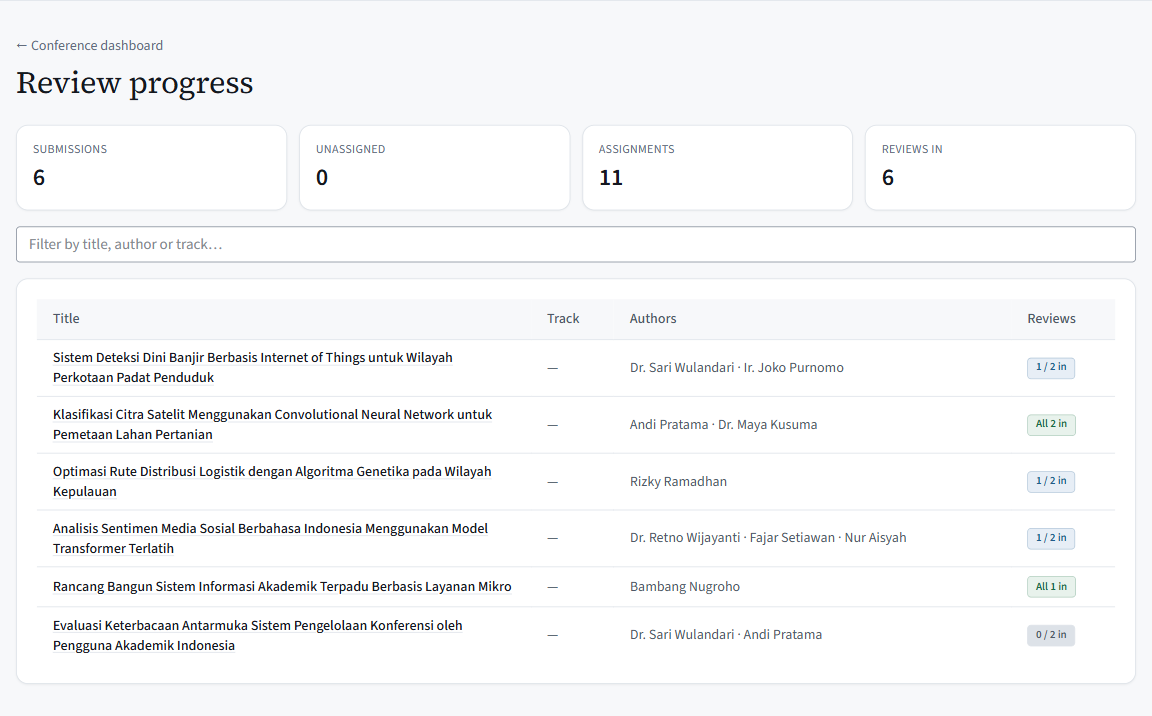
    Invite a programme committee by link, assign with conflicts flagged, and watch progress per paper. Reviewers who decline drop out of the count, so you are never waiting on someone who already said no.

  4. 4

    Decide and notify

    Accept, minor revision or reject, one paper at a time or in a batch. The letter is filed with the decision, and revising adds to the history without erasing it.

  5. 5

    Register and pay

    Separate rates for students, members and presenters, paid through Xendit. One person pays once and gets one receipt, however many times the bank confirms it.

  6. 6

    Publish

    Accepted authors upload the final manuscript; the chair builds the programme on a public page that needs no account, and can download the finished proceedings whenever the archive needs them.

What it guarantees

Things it refuses to get wrong

None of these can be undone once they have happened, so the system does not let them happen at all.

Reviewers and authors never see each other’s names.
Checked automatically on everything sent out, before it can reach an author.
A rejected paper cannot reach the proceedings.
Every upload is checked against the current decision twice, once when it begins and again when it finishes. There is no side door in.
Money is never counted twice.
A payment confirmed three times still produces exactly one receipt, and charges the attendee once.
Deadlines mean the same thing everywhere.
Stored as one exact moment and shown in the conference’s own timezone. We check that Jakarta, Jayapura and a laptop set to London all read the same hour.
Decisions are never overwritten.
Revising a decision records a new one with a reason, and the original stays on file. Authors see the decision that stands, never the discussion behind it.
Backups that have actually been restored.
Backups run nightly. Before every pilot we restore one into a spare database and check the data comes back intact.

Trusted by

  • Universitas Contoh
  • Institut Sains Nusantara
  • Politeknik Bahari Contoh
  • Universitas Cendana
  • Institut Teknologi Rimba
3 more
  • Universitas Kartika
  • Sekolah Tinggi Anggada
  • Universitas Meridian

Honest about the edges

What it deliberately does not do yet

  • Refunds, discount codes and institutional bulk payment are handled by the treasurer, outside the system.
  • Review is single-blind. Reviewers see author names; authors never see reviewers.
  • No reminder emails — chairs follow up from the outstanding list on the dashboard.
  • The interface is in English. The user guide comes in English and Bahasa Indonesia.

Start with one conference.

Create the conference, add your tracks and dates, invite the committee by link. The public page is live the moment you save — and the getting-started checklist on the dashboard names the next five things to do.